
Blog · Data modeling Personal story
Why I prefer MongoDB over SQL Server
Fifteen years of SQL Server and a stack of Microsoft certificates. I wasn't looking for anything else. Then a few things happened that SQL Server had no good answer for, and today I wouldn't go back. This is that story, told on one ordinary invoice, with the answers to the fears I had myself: no joins, duplicated data, no schema.
If you know SQL Server, you already know most of MongoDB: indexes, query plans, replicas, backups. What changes is one habit. You store an invoice as an invoice, not spread over five tables. And the fear that “without joins everything gets duplicated” falls apart the moment you look at a real invoice.
How it clicked
On paper: exams in SQL Server, ASP.NET and C# that added up to an MCPD, and an MCT on top, so I taught it to others too. Then a few moments changed my mind:
-
A migration script that ran for 12 hours
A new column, a data conversion, rebuilt indexes. Twelve hours of a maintenance window while customers waited. In MongoDB there is no such script to wait for.
-
The license price
SQL Server is paid per core. More customers, more cores, a bigger bill. And the things we needed (more replicas, online index rebuilds) were Enterprise only.
-
Customers bigger than any server
Some customers grew so big there was no hardware left to buy. Split them over more servers? Not with foreign keys tying every table to every other. MongoDB splits a collection over servers (sharding) as a built-in feature.
-
Columns that hold more than a number
At Tabidoo, users build their own apps, and a “column” can hold an address, a chat, a list of files. In SQL Server that's either a dozen extra tables or JSON in a text column. And indexing inside that JSON meant a computed column for every path. In MongoDB it's just a field, and it gets an index like any other.
What MongoDB gave me instead
NOLOCK “fixes” that quietly return wrong numbers. Reads don't wait for writes, and an invoice with all its items is saved in one go, no transaction needed.
$lookup is there, so the first steps feel familiar. After a while you'll need it far less than you think.
explain(), slow query logs. Your SQL Server instincts still work.
One invoice, two databases
An invoice: a customer with a billing address, a few items, a total. In SQL Server the textbook model looks like this:
{
  "number": "2025-000042",
  "issuedAt": "2025-03-14",
  "status": "paid",
  "customer": {
    "_id": "6ac95b…",
    "name": "Acme s.r.o.",
    "address": {
      "street": "King Street 42",
      "city": "Brno",
      "zip": "60200"
    }
  },
  "items": [
    { "sku": "SKU-10133",
      "name": "Laptop stand",
      "qty": 2, "unitPrice": 426 },
    { "sku": "SKU-10164",
      "name": "Office chair",
      "qty": 3, "unitPrice": 673 }
  ],
  "total": 2871
}Now print it. In SQL:
SELECT i.Number, c.Name, a.City, p.Name AS Item, it.Qty, it.UnitPrice
FROM Invoices i
JOIN Customers c         ON c.Id = i.CustomerId
JOIN CustomerAddresses a ON a.Id = i.BillingAddressId
JOIN InvoiceItems it     ON it.InvoiceId = i.Id
JOIN Products p          ON p.Id = it.ProductId
WHERE i.Number = '2025-000042';Two items, two rows, the header copied into each. Then your code glues it back into one invoice.
Funny, isn't it? The join just duplicated the data, every time you read. In MongoDB:
db.invoices.findOne({ number: "2025-000042" })The invoice comes back whole, in the shape your code wants. And of course indexes reach inside the document, so finding invoices by customer name is just as fast:
db.invoices.createIndex({ "customer.name": 1 })
db.invoices.find({ "customer.name": "Acme s.r.o." })
The customer has more addresses
Billing, shipping, the warehouse in Ostrava. In SQL that's why CustomerAddresses is a table of its own, with a foreign key and a Type column. In MongoDB it's simply a list:
{
  "name": "Acme s.r.o.",
  "addresses": [
    { "type": "billing",  "street": "King Street 42", "city": "Brno" },
    { "type": "shipping", "street": "Mill Road 7",    "city": "Ostrava" }
  ]
}
Then someone wants an email on the address
Invoices should go to accounting. One address in ten has such an email. SQL Server:
ALTER TABLE CustomerAddresses ADD Email nvarchar(254) NULL;Plus a migration script, the entity, the DTO, all deployed in the right order. And a column that stays empty in 90% of rows forever. In MongoDB you write email into the one address that has it. Nothing else changes.
And then the customer wants two emails
“invoices@ and accounting@, both please.” This is where the SQL model really hurts:
Email2 column
And Email3 next year. Every search by email now checks three columns.
"a@x; b@x". Goodbye index, goodbye validation, hello LIKE '%…%'.
In MongoDB the email simply becomes a list:
{ "type": "billing", "city": "Brno",
  "emails": ["[email protected]", "[email protected]"] }
And an index on that list finds the customer by any of the emails, as fast as before:
db.customers.createIndex({ "addresses.emails": 1 })
db.customers.find({ "addresses.emails": "[email protected]" })
“But without joins, the data gets duplicated and goes out of sync”
This is what everyone told me before the switch. Look at what the invoice document actually copies:
-
The address on an invoice must not change
The customer moves in June. In the SQL model above, the March invoice printed again in July shows the new address, because it points to a row that was updated. That's not a normalized invoice. That's a wrong one.
MarchInvoice issued to King Street 42, Brno JuneThe customer moves to Prague JulyReprint from SQL: Station Road 9, Pragueevery real SQL schema copies the address into the invoice anyway. Same with the price on an invoice item: nobody joins today's price from
Products. That isn't duplication, it's a snapshot. MongoDB just makes it the natural thing. -
What must follow is small and rare
The customer changes its name. Paid invoices keep the old one (see above). Open ones should follow:
db.invoices.updateMany(
  { "customer._id": acmeId, status: "open" },
  { $set: { "customer.name": "Acme Group s.r.o." } }
)
copy only fields that rarely change, like a name. Never things that change every minute, like stock or a balance. Those stay in one place and you look them up.
-
Not everything goes into one document
The famous “Why You Should Never Use MongoDB” article (2013) was about a social network, where everything points to everything. Stuffing that into documents really does go wrong.
embed what belongs to the parent and is read with it (items, addresses). Point to what has a life of its own (the customer, the product).
Away with the bogeyman: “no fixed schema”
The schema doesn't disappear. It moves to where you already have one: your classes. C#:
public record Invoice(ObjectId Id, string Number, DateTime IssuedAt, string Status,
                      CustomerRef Customer, List<InvoiceItem> Items);
public record Address(string Street, string City, string Zip, List<string>? Emails = null);

var invoices = db.GetCollection<Invoice>("invoices");
var open = await invoices.Find(i => i.Customer.Id == customerId && i.Status == "open")
                         .ToListAsync();
TypeScript:
interface Invoice {
  number: string;
  status: "open" | "paid";
  customer: { _id: ObjectId; name: string; address: Address };
  items: InvoiceItem[];
}

const invoices = db.collection<Invoice>("invoices");
await invoices.find({ status: "payed" });   // compile error: not "open" | "paid"
Rename a property and the compiler finds every query. And if you want the database itself to say no to bad data (from scripts, other services, a colleague in a hurry), it can:
db.runCommand({ collMod: "invoices", validator: { $jsonSchema: {
  required: ["number", "customer", "items"]
} } })
The difference from SQL: a new field needs no migration window. No migration scripts that must run before the deploy, after the deploy, and never twice. Old documents just don't have the field yet, and your class says what that means (Emails = null).
Thinking about it?
Don't rewrite the whole system over a weekend. Take one new feature, or the part that hurts most in SQL (lots of optional columns, lists squeezed into rows, a table nobody dares to alter) and start there. Most of what you know comes along:
$lookup when it isexplain()Would I still pick SQL for something? For data that is a web of relations by nature, maybe. For the usual business app (customers, orders, invoices, settings) I haven't looked back.
The one habit I kept: tables
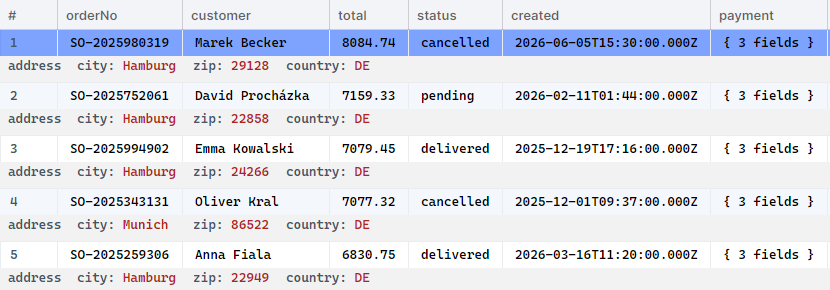
After fifteen years in SQL Server Management Studio, a wall of JSON is not how I want to look at data. So BsonJet shows a collection as a grid, with a nested object (the address) unfolded as a row under its document:
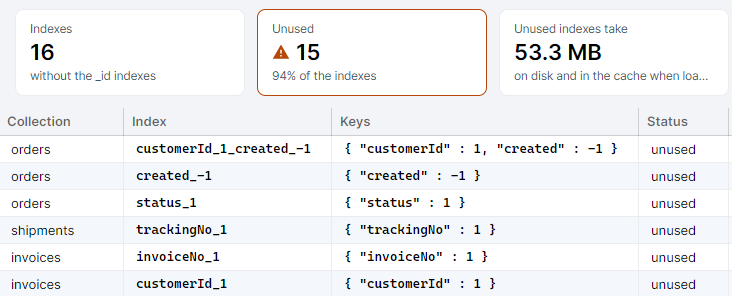
And the other SSMS reflex, “which indexes are useless?”, has an answer too: index usage summed over all servers of the replica set, unused ones first.
Coming from SQL Server? Have a look around.
The full version is free for personal use, no registration.