
Blog · Self-hosting
Install MongoDB on Ubuntu as a replica set
Installing MongoDB is a piece of cake. Don't let the forum threads scare you: with the right steps it takes three minutes, and here they are, in one command. You get a replica set from day one, so your app can use transactions and a second server is one line away.
The newest MongoDB (9.0 today) as a replica set, with a password and a keyfile, listening only where it should:
curl -fsSL https://bsonjet.com/blog/install-mongodb-ubuntu-replica-set/install-mongodb.sh \
  | sudo bash
About 3 minutes on a clean Ubuntu 24.04. At the end it prints your connection string: user admin and a generated password, also saved for root in /root/mongodb-credentials.txt (sudo cat it any time).
With options, all of them optional:
curl -fsSL https://bsonjet.com/blog/install-mongodb-ubuntu-replica-set/install-mongodb.sh \
  | sudo \
  MONGO_HOST=db.example.com \
  ADMIN_USER=admin \
  ADMIN_PASSWORD='YourStrongPassword' \
  MONGO_VERSION=8.0 \
  RS_NAME=rs0 \
bash- MONGO_HOST: the DNS name other machines connect to (your app server, your laptop, a second MongoDB later). Default: the server's name.
- ADMIN_USER, ADMIN_PASSWORD: your own login. Default:
adminand a generated password. - MONGO_VERSION: a specific version, e.g. 8.0. Default: the newest. RS_NAME: the replica set name, default rs0.
It's 282 lines, read them first. Prefer Docker? Install MongoDB in Docker as a replica set.
Why a replica set on one server?
- Room to grow, for free. A second or third server later is one
rs.add(): no reinstall, no downtime, no license. If one server dies, another takes over. - A move without downtime. Add the new server, let it sync, switch, remove the old one. We measured it: 0 failed writes.
- Transactions. Without a replica set, the first transaction fails with
Transaction numbers are only allowed on a replica set member or mongos. Mongoose, Prisma and everywithTransaction()need one.
The price: the oplog, by default 5% of the free disk (at most 50 GB). That's it.
The traps the script avoids
-
apt install works, mongod doesn't start
On Ubuntu 24.04 with a newer kernel, MongoDB 8.0+ refuses to start:
Linux kernel versions 6.19 and newer has a known incompatibility. Docker too. The official advice, a newer kernel, doesn't help on Ubuntu. We tried.one setting in the mongod service causes it, and the script switches it off. Also after a future kernel update. Installing by hand? This is the file:
# /etc/systemd/system/mongod.service.d/kernel-6.19.conf [Service] UnsetEnvironment=GLIBC_TUNABLES -
The newest Ubuntu isn't supported yet
Today on 26.04 the MongoDB repo even exists, just without the server, so you get
Unable to locate packagehalfway through. The script checks first and stops with a clear message. (Or use Docker, it doesn't mind.) -
Illegal instruction (core dumped)MongoDB 5.0+ needs a CPU with AVX. Old hardware and some cheap VPS don't have it. Checked before anything is installed.
-
Authentication on, replica set broken
A replica set with a password needs a keyfile, and mongod refuses one that others can read. The script makes it,
chmod 400, owned bymongodb. -
The app can't find the server
The replica set tells every client its own name for the server. Set it up as
localhostand nobody else can connect.the script uses the server's name and checks it works. Will other machines connect? Give it its DNS name from day one with
MONGO_HOST(see above). And it never listens on a public address by accident, so port 27017 isn't open to the internet. Remember MongoBleed: about 75,000 exposed servers.
Updates: patches and the next version
# the newest patch of your version (security fixes)
curl -fsSL https://bsonjet.com/blog/install-mongodb-ubuntu-replica-set/update-mongodb.sh \
  | sudo bash

# the next version
curl -fsSL https://bsonjet.com/blog/install-mongodb-ubuntu-replica-set/update-mongodb.sh \
  | sudo bash -s -- --to 9.0
Why not just apt upgrade? It installs the patch and keeps the old mongod running: we checked, same process, binary deleted on disk. A security fix does nothing until a restart, and the script restarts. It also never leaves your version. Versions can't be skipped, so --to takes one step at a time:
It also sets the feature compatibility version on both sides of the step (the part everyone forgets until the next upgrade fails). Not sure which version you run? BsonJet shows it for every server, next to the newest MongoDB out there.
On more servers, run the patch update on the secondaries and the arbiter first, the primary last. --to is for a single server; a set follows MongoDB's rolling upgrade.
Adding more servers
Always an odd number. A replica set needs a majority of votes to pick its primary: with two servers, when one stops, the other has 1 vote of 2 and turns read-only. Two servers are less available than one.
The cheapest odd number is two data servers and an arbiter. The arbiter only votes, keeps no data and runs on the smallest VPS, or next to your app.
- On db1, print the keyfile and the connection string:
sudo cat /etc/mongodb/keyfile /root/mongodb-credentials.txt - On db2, install it with both of them:
curl -fsSL https://bsonjet.com/blog/install-mongodb-ubuntu-replica-set/install-mongodb.sh \ | sudo \ MONGO_HOST=db2.example.com \ JOIN='paste MONGO_URI from db1' \ KEYFILE='paste the keyfile from db1' \ bash - On the arbiter, the same plus
ARBITER=1:curl -fsSL https://bsonjet.com/blog/install-mongodb-ubuntu-replica-set/install-mongodb.sh \ | sudo \ MONGO_HOST=arbiter.example.com \ JOIN='paste MONGO_URI from db1' \ KEYFILE='paste the keyfile from db1' \ ARBITER=1 \ bash - In your app, list both data servers:
db1.example.com,db2.example.com.
Each new server copies the data first and gets its vote only then, so the set never loses its majority.
Moving to a new server without downtime
Add the new server as above. When it's a secondary, let it take over and remove the old one, on the primary:
cfg = rs.conf()
cfg.members.find(m => m.host === "db2.example.com:27017").priority = 2
rs.reconfig(cfg)
// a few seconds later db2 is the primary; remove the old one
rs.remove("db1.example.com:27017")
In our test an app kept writing every 100 ms through the whole move: 0 failed writes. One catch: the running app found the new server by itself, but its connection string still names the old one. Update it before the next restart.
Then see what it's doing
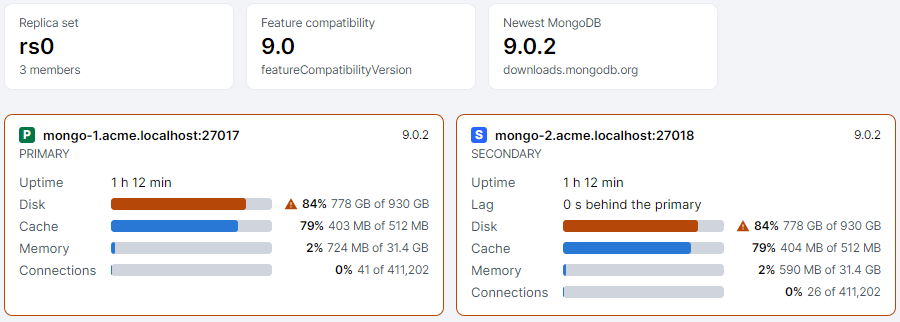
Once it runs, BsonJet shows the whole replica set at a glance: every member's role, lag, disk and cache, the feature compatibility version and whether a newer MongoDB is out. Handy while the new server syncs.
Connect to your new server.
The full version is free for personal use, no registration.