
Blog · Comparing data How-to
How to compare two MongoDB collections or databases
Staging against production, a restore against the original, a migrated database against the old server. Sooner or later you need to know not only whether they differ, but which documents and which fields. Here is what MongoDB itself gives you, step by step, where it stops, and how to get the rest.
dbHash tells you whether a collection differs. On one server, one aggregation with $lookup lists the documents that differ. Across two servers MongoDB has no command for it: both sides have to be read and compared document by document, by a script or a tool. Both are at the end.
1. A quick look: counts and indexes
Start with what costs nothing. Run this on both sides and put the outputs next to each other:
const shop = db.getSiblingDB("shop")
shop.getCollectionNames().sort().forEach(c =>
  print(c, shop[c].estimatedDocumentCount(), shop[c].getIndexes().map(i => i.name).join(" ")))
A missing collection, a missing index or a thousand missing documents show up right away. You know the limits: on a live database the numbers move while you look, and the same count can still hide one missing document and one extra, or a changed price. For that you need more.
2. Same or not: dbHash
dbHash computes a hash of every collection on the server. Run it on both sides and compare:
db.getSiblingDB("shop").runCommand({ dbHash: 1, collections: ["orders"] }).collections
// left:  { orders: '0ef010fe0d0a8af5ca2e7406515a690e' }
// right: { orders: 'aacd1f3944b66298683531092a92763a' }
Different hashes, so something in 200,000 orders differs. What, it won't say. Before you run it on production, read the documentation: it takes a shared (S) lock on the database, which prevents writes until the command completes, it is not supported on Atlas M0 and Flex clusters, and an empty collection gives the same hash as one that does not exist. A good final yes or no on a quiet server.
3. Which documents, on one server: $lookup
When both collections are in the same database (a copy next to the original, a restore into another name), one aggregation finds the documents that differ or are missing in the copy:
db.orders.aggregate([
  { $lookup: { from: "orders_copy", localField: "_id", foreignField: "_id", as: "copy" } },
  { $set: { copy: { $first: "$copy" } } },
  { $match: { $expr: {
      $ne: [ { $unsetField: { field: "copy", input: "$$ROOT" } }, "$copy" ] } } },
  { $project: { _id: 1, missingInCopy: { $eq: [ { $type: "$copy" }, "missing" ] } } }
])
And the other way round, what only the copy has:
db.orders_copy.aggregate([
  { $lookup: { from: "orders", localField: "_id", foreignField: "_id", as: "orig" } },
  { $match: { orig: { $size: 0 } } },
  { $project: { _id: 1 } }
])
On our 200,000 orders that took 3.7 and 1.4 seconds, and the lookup uses the _id index. Fields that always change (updatedAt) you remove on both sides with another $unsetField. Three things to know:
- It says which documents, not which fields. Open both and look.
- The comparison is MongoDB's own. Numbers compare by value, so an int
1changed to a double1.0is no difference. Field order counts: the same fields in another order are a difference. - Same database only.
fromis a collection in the same database. Another database, let alone another server, is out of reach.
4. Across two servers: read both sides
And that is where MongoDB stops. No command compares a collection with a collection on another server, so there are two ways. For a small collection, copy it next to the other one (mongodump --archive | mongorestore --nsFrom="shop.orders" --nsTo="shop.orders_copy") and use $lookup. Otherwise something has to read both sides and compare them document by document. If you write it yourself, these are the parts that are easy to get wrong:
- Pair the documents by
_id, in batches. Read a thousand documents of one side and fetch their pairs with_id: { $in: [...] }from the index of the other. Then one more pass over only the_ids of the other side, to find what the first one is missing. No sorting, nothing big in memory, and it works for any type of_id. - Keep the number types. mongosh turns an int
1and a double1.0into the same JavaScript number, so a script never sees that change. Read with{ promoteValues: false }. - Decide what is a difference. Field order usually is not;
v: nulland novat all usually is. - Mind the network. Every document travels once from each side. For millions of documents over a slow VPN run it on a machine next to the servers.
Where we got burned: hashing on the server
When we built the comparison in BsonJet, reading every document from both servers felt wasteful. So we let each server hash its documents with $toHashedIndexKey and compared only the _id and an 8 byte hash, reading the documents themselves only when the hashes differed. Fast and elegant. While writing this article we tried this:
db.aggregate([
  { $documents: [
      { price: 19.99 }, { price: 19.49 },
      { items: [ { qty: 1 } ] }, { items: [ { qty: 1.5 } ] } ] },
  { $project: { _id: 0, doc: "$$ROOT", hash: { $toHashedIndexKey: "$$ROOT" } } }
])
// { price: 19.99 }          → 5229801762837905173
// { price: 19.49 }          → 5229801762837905173   the same
// { items: [ { qty: 1 } ] }   → -3916166717627668316
// { items: [ { qty: 1.5 } ] } → -3916166717627668316  the same
$toHashedIndexKey uses the hash function of hashed indexes, and those truncate floating-point numbers to 64-bit integers before hashing. In a whole document as well, nested and in arrays. Every price, rate or coordinate that differs only after the decimal point gets the same hash, and so do 1 and 1.0. The page of the operator doesn't mention it; we saw it on MongoDB 9.0.4. The newer $hash (8.3+) over { $toString: "$$ROOT" } does tell 19.99 from 19.49, but the string writes 1 and 1.0, or an ObjectId and its hex string, the same way.
So no hashing: since version 1.0.11 BsonJet compares the documents themselves, byte by byte, and field by field where the bytes differ. If you write your own comparison, do the same.
Two ready-made ways
From the command line: a script for mongosh
So you don't have to write step 4 yourself, we did it for you: compare-collections.js, about 100 lines for mongosh, free to use. Read it before you run it. It only reads, compares the indexes too, and exits with 1 when the collections differ, so it fits into a deployment script as well.
curl -fsSLO https://bsonjet.com/blog/compare-two-mongodb-collections/compare-collections.js
LEFT_URI="mongodb://source-host:27017" \
RIGHT_URI="mongodb://target-host:27017" \
LEFT=shop.orders \
  mongosh --nodb --quiet compare-collections.js
Another name on the right: RIGHT=shop_copy.orders. Fields that always change: IGNORE="updatedAt,meta.version". Our test, 200,000 orders on two servers with the same count on both sides:
shop.orders (left) vs shop.orders (right), 17.6 s
same:       199,993
different:  5
  1017: items.0.price
  1018: items.0.price
  52000: customer.id
  99999: status, updatedAt
  150001: updatedAt
only left:  2
  7
  123456
only right: 2
  200001
  200002
indexes:    customer.id_1 only left
In a UI: Compare and sync in BsonJet
The script tells you what differs. BsonJet shows it and fixes it. Right-click a database → Compare database with… (or a collection → Compare collection with…), choose any saved connection for the other side and press Compare. Every collection gets its row: the same, different, or only on one side, with the counts.
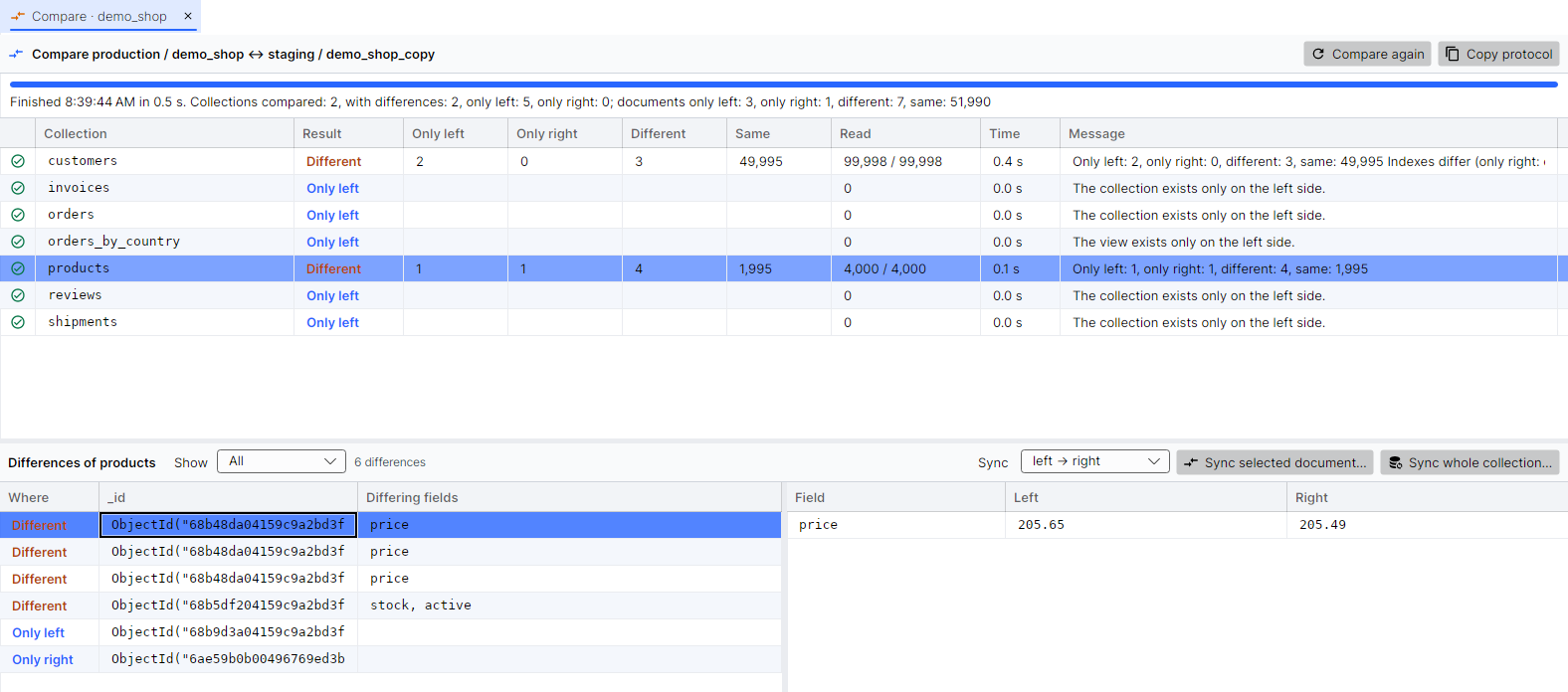
- Every difference with both values. Select a document to see each differing field on the left and on the right, with the type when the types differ (
1against1.0). A document only one side has is shown whole. - What not to compare. Ignore fields like
updatedAt, meta.version, or compare only the documents of a filter, say last month's orders. - A whole database at once. Collection by collection, with missing collections, different indexes and views.
- Big collections. Both sides are read in ranges of
_idat the same time and nothing is loaded into memory; a dropped connection is waited out, like in a copy.
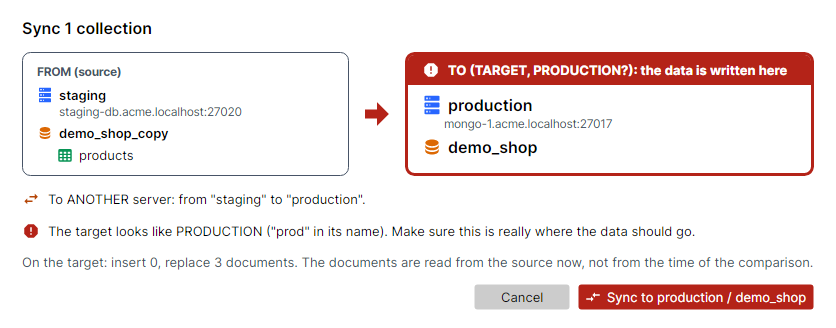
And then the step a script leaves to you: Sync. In either direction, the selected documents or whole collections: what is missing is inserted, what differs is replaced, what is extra is deleted. Before anything is written, the same confirmation as for a copy shows the source, the target and how many documents change, framed in red when the target looks like production.
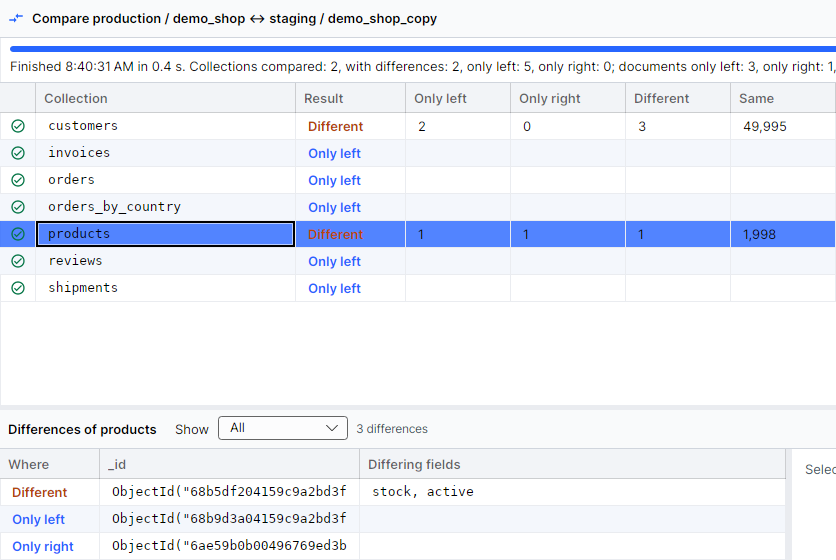
When the sync is done, Compare again checks the result:
Compare your own databases.
The full version is free for personal use, no registration.