
Blog · Copying data
How to copy a MongoDB database to another server
Friday, 4 pm: “just copy the database to staging”. The first answer on Google still says db.copyDatabase(). It was removed in MongoDB 4.2, back in 2019. Here is what works today, for a whole database or a single collection, and the six things that bite everyone on the first try.
Pipe mongodump straight into mongorestore. No temp files, no disk:
mongodump --uri="mongodb://source-host:27017" --db=shop --archive \
  | mongorestore --uri="mongodb://target-host:27017" --archive
No mongodump on your machine? Since MongoDB 4.4 the Database Tools are a separate download.
Pick the tool
$out / $merge
The server copies it by itself. Fast, but it can't leave the cluster, and $out doesn't bring the indexes.
mongodump | mongorestore
The standard. Works everywhere. No resume, no undo.
The one-liner, two more ways
# the whole database under a new name
mongodump --uri="mongodb://source-host:27017" --db=shop --archive \
  | mongorestore --uri="mongodb://target-host:27017" --archive \
      --nsFrom="shop.*" --nsTo="shop_copy.*"

# just one collection
mongodump --uri="mongodb://source-host:27017" --db=shop --collection=orders --archive \
  | mongorestore --uri="mongodb://target-host:27017" --archive
The six traps
-
Authentication failed, and the password is right
Your user lives in
admin, but--db=shopmakes mongodump log in againstshop. A database in the URI path (…:27017/shop) does the same. All you get is(AuthenticationFailed) Authentication failed.add
authSource=adminto the source URI:mongodump --uri="mongodb://user:pass@source-host:27017/?authSource=admin" --db=shop ... -
Restoring into an existing collection doesn't overwrite anything
mongorestore only inserts. A document whose
_idis already there fails as a duplicate, the old version stays, and at the very end you get1520 document(s) failed to restore. Congratulations, you have a half-updated collection.add
--drop. It drops each collection before restoring it. Check the target URI twice; there is no undo. -
Stuck at 100% for twenty minutes
It isn't frozen. The data is in; now the target builds the indexes (after the data, one collection at a time). On a big collection that is the long part. Don't Ctrl+C it.
// on the target: see the index builds working db.currentOp({ "command.createIndexes": { $exists: true } }) -
The VPN drops at 87%
mongorestore can't continue. Run it again with
--dropand you are back at 0%. Without it, it skips what is already there, slowly: the whole dump goes over the wire again and every existing document is reported as failed (see trap 2).for big data over a shaky link, dump to a file on a machine next to the source, move the file with something that resumes (
rsync --partial), restore next to the target. -
The copy works, the app can't log in
mongodump --dbtakes your collections, not the people allowed to read them. Users usually live inadmin.you need both:
--dumpDbUsersAndRoleson dump and--restoreDbUsersAndRoleson restore. And only for users created in that database. Users created inadmin(the usual way) you create on the target yourself. -
You just slowed down production
By default mongodump reads everything through the primary, the same one serving your users right now.
add
--readPreference=secondaryto mongodump, with the replica set URI (all members ormongodb+srv://). Pointed at a single host, it reads from that host.
Did it really copy everything?
Matching counts prove exactly one thing: the counts match.
// run on both servers
db.orders.countDocuments()
db.orders.aggregate([{ $group: { _id: null, sum: { $sum: "$total" } } }])
A sum of a numeric field catches more than a count, and costs one collection scan. A real field-by-field check needs a compare tool. Which brings us to:
The Ctrl+C, Ctrl+V way
We got tired of all of the above, so BsonJet copies data like files: select a database or a few collections in the tree, Ctrl+C, click the target server, Ctrl+V. Or right-click → Copy collection to… for a new name or only part of the data.
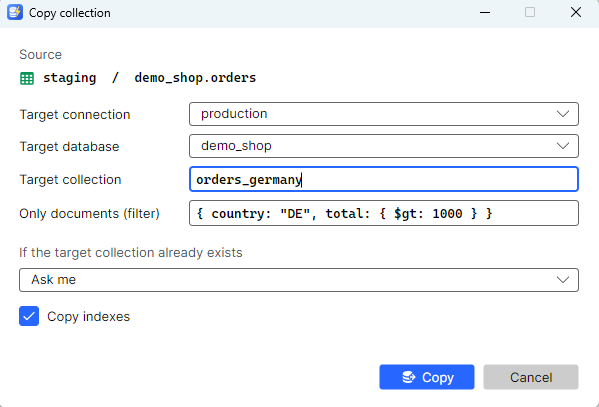
- Trap 1 never happens. The copy uses the connection you already browse with: if you can see the data, you can copy it. No pipes, no temp files, raw BSON, several collections in parallel, compressed on the wire.
- Trap 2, solved by asking. If the target collection exists, you choose: drop and replace, update documents with the same
_id, add only new ones, or skip. - Trap 4, solved by waiting. The connection drops, the job waits up to 10 minutes and continues from the last
_idit copied. Nothing twice, nothing from zero. - Trap 5, honestly: users and roles aren't copied either. Create them on the target.
And because Friday at 4 pm is when it happens:
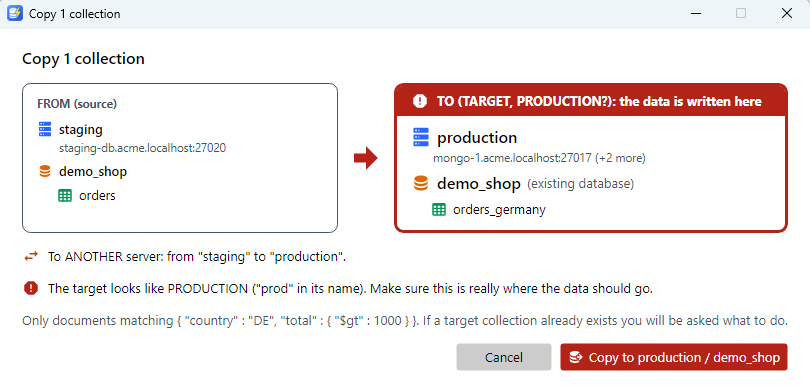
Afterwards, Compare database with… checks both sides field by field and syncs what differs. That's the check counts can't do.
Try it on your own data.
The full version is free for personal use, no registration.